
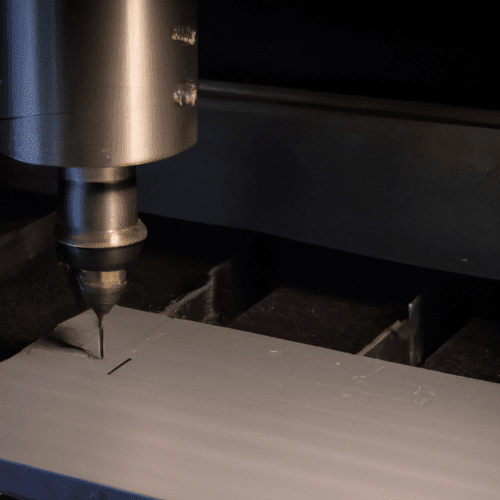
Integrating a Computer Numerical Control (CNC) machine into a home workshop is increasingly feasible for hobbyists and small businesses. Modern desktop CNC routers offer significant capabilities for various materials, making precision fabrication accessible. Careful planning for power, safety, and environmental control ensures a productive and secure setup.
Desktop CNC Routers: Capabilities and Selection
Desktop CNC routers have seen substantial growth, transforming from niche industrial tools into accessible equipment for home users. These compact machines can perform 2D and 3D cutting, carving, milling, and drilling operations on a diverse range of materials. Common applications include working with wood, acrylic, MDF, plywood, ABS, foam, and even soft metals like aluminum and brass.
Key features distinguishing these machines include frame rigidity, spindle power, and available work area. Machines in the $800–$1,500 range often feature more rigid frames, dedicated spindles, and ball screws, enabling them to handle aluminum regularly. Entry-level models, such as the Genmitsu 3018-PRO, are ideal for learning the workflow and cutting wood or plastics, with light engraving on aluminum possible.
Spindle power is a critical specification, with many desktop units featuring high-frequency spindles ranging from 500W to 2.2kW, offering speeds from 6,000 to 24,000 RPM. Work area dimensions vary significantly; smaller units like the Lunyee 3018 Pro Ultra offer a 300 × 180 × 80 mm area, while larger desktop models provide more generous space for bigger projects. Software compatibility, such as with Carbide Create or Fusion 360, also plays a role in ease of use and project complexity.
Selecting the appropriate desktop CNC machine depends heavily on the intended materials, part sizes, and budget. The table below provides a comparison of typical specifications for popular hobbyist CNC routers available in 2026, highlighting their core capabilities and price points.
Single-Phase Electrical Power for Home CNC
| Model Type | Typical Work Area (mm) | Spindle Power (W) | Motion System | Approximate Price Range (USD) |
|---|---|---|---|---|
| Entry-Level (e.g., Genmitsu 3018-PRO) | 300 x 180 x 45 | 775 motor / 60-100 | Lead Screws | $150 – $600 |
| Mid-Range (e.g., Genmitsu 4040-PRO, Twotrees TTC450 Pro) | 400 x 400 x 80 to 450 x 450 x 100 | 300 – 500 | Lead Screws / Linear Rails | $400 – $1,200 |
| Prosumer (e.g., Carvera Air, Shapeoko) | 600 x 600 x 150+ | 800 – 2200 | Ball Screws / Linear Rails | $1,500 – $5,000+ |
Most residential homes and small workshops operate on single-phase electrical power, typically providing 120V or 240V. This differs significantly from the three-phase power common in industrial settings, which offers more consistent and robust power delivery for large, high-demand motors. Hobbyist CNC machines are generally designed to function effectively within these single-phase constraints.
Smaller desktop CNC machines often run on a standard 120V outlet. However, many professional-grade or more powerful hobby machines require a dedicated 220V single-phase circuit, typically drawing 30-40 amps. It is crucial to verify the manufacturer’s specifications for the exact voltage and amperage requirements to ensure compatibility and prevent electrical issues.
For larger CNC equipment that explicitly demands three-phase power, a rotary phase converter can be employed to generate the necessary third phase from a single-phase supply. When sizing a phase converter for CNC machines, a general rule is to apply a 2x multiplier to the largest motor’s horsepower rating. This accounts for high starting inrush currents and continuous high-torque cutting loads characteristic of CNC spindles.
Proper installation involves running a dedicated, properly sized single-phase feed directly from the main electrical panel to the phase converter, avoiding shared circuits with other large loads. The converter should be mounted near the equipment to minimize voltage drop over the three-phase runs. Always consult local electrical standards and regulations before undertaking any wiring modifications.
Ensuring Safety in the Home CNC Workspace
Operating a CNC machine, even a desktop model, presents inherent hazards from rotating cutting tools, moving parts, electricity, and noise. Prioritizing safety is paramount to protect both the operator and the equipment. A disciplined approach to workspace organization and machine operation is essential.
Personal Protective Equipment (PPE) forms the first line of defense. Operators must always wear ANSI-approved impact safety glasses with side shields to protect against flying chips and debris. Hearing protection, such as NRR 25+ over-ear muffs or foam plugs, is critical, as CNC routers can generate noise levels exceeding 90 dB, leading to hearing damage within 30 minutes. A minimum N95 dust mask, or a P100 half-face respirator for regular MDF work, is also necessary to protect against fine dust inhalation.
Safe operating practices include never reaching into the cutting area while the spindle is rotating and using proper chip removal tools instead of hands. Workpieces must be securely clamped to prevent movement during machining, which can cause tool breakage or material ejection. Before starting any operation, a thorough pre-operation checklist should be completed, inspecting for loose bolts, worn belts, and ensuring all safety shields and emergency stop buttons are functional.
Machine guarding is also vital; fully enclosed cutting areas with interlocked doors, chip guards, and spindle guards prevent accidental contact with moving components. Emergency stop (e-STOP) buttons, typically red and prominently located, must be easily accessible and tested regularly to ensure they immediately halt all axis and spindle motors in an emergency. Never wear loose clothing, dangling jewelry, or gloves when operating machines with rotating components, as these can become entangled.
Effective Noise and Dust Containment Strategies
CNC machines generate significant noise and fine dust, both of which require effective containment in a home environment. Unmanaged dust poses serious health risks, including respiratory problems, and can damage machine components, reducing accuracy and lifespan. Noise levels from cutting operations can be disruptive and harmful to hearing.
A comprehensive dust collection system is crucial. This typically includes a dust shoe mounted around the spindle to capture debris at the source, a flexible hose, and a shop vacuum or dedicated dust collector. For desktop CNC machines, a shop vacuum with high static pressure is effective, especially when combined with a cyclone separator to pre-filter larger chips and maintain consistent suction. A filtration system, ideally with a HEPA filter, is essential to capture fine particles, particularly from materials like MDF, which produces carcinogenic dust. Grounded vacuum hoses are recommended to prevent static discharge that could affect machine control systems.
Noise containment primarily involves constructing a rigid enclosure around the CNC machine. Dense materials like MDF (medium-density fiberboard) or plywood are commonly used for the main structure due to their sound-blocking properties. Adding damping layers, such as Rockwool Comfortboard or mass-loaded vinyl, to the interior panels significantly absorbs vibration and reduces resonance. Sealing all gaps around doors and cable entries with weatherstripping is critical, as high-frequency noise can penetrate small cracks.
Vibration isolation is another key aspect of noise reduction. Placing the machine on rubber feet or pads prevents vibration from transferring into the workbench or floor, which amplifies low-frequency noise. Adequate airflow within the enclosure is necessary to prevent overheating, balancing cooling requirements with soundproofing efforts. Simple ventilation systems with affordable fans can be integrated, ensuring air exchange without compromising noise reduction.
Budgeting for a DIY Home CNC Setup
Establishing a home CNC setup involves more than just the machine’s purchase price; a comprehensive budget must account for various components and ongoing expenses. Initial costs can range widely, from a few hundred dollars for entry-level kits to several thousand for more capable benchtop mills. A small CNC router kit for hobbyists typically starts at $2,500 and can go up to $5,000.
The machine itself is the largest single expense. Budget CNC routers, often under $600, are suitable for cutting wood and plastic, with limited aluminum engraving. Machines in the $800–$1,500 range offer increased rigidity and spindle power for regular aluminum work, while those above $3,000 enter the benchtop mill category, aimed at small businesses and production. Prosumer models like the Carvera Air or Shapeoko can range from $1,500 to over $5,000, offering larger work areas and advanced features.
Essential accessories and tooling represent a significant additional investment, often totaling $75-$150 for day-one essentials. This includes safety gear such as Z87.1-rated safety glasses ($8-15), NRR 25+ hearing protection ($10-25), and an N95 or P100 respirator ($10-30). A basic set of end mills, including a 1/4′ single-flute upcut endmill, is also crucial. Workholding solutions, such as clamps and spoilboard materials, are necessary for secure operation.
Ongoing costs include replacement cutting tools, materials for projects, and potential software subscriptions. While some CAD/CAM software offers free basic licenses, advanced features may require paid versions. Electricity consumption should also be factored in, with some machines using 1.0 to 1.2 kWh per hour, impacting operational costs depending on local rates. Regular maintenance, including dust collection filter replacements and machine lubrication, also contributes to the long-term budget.