
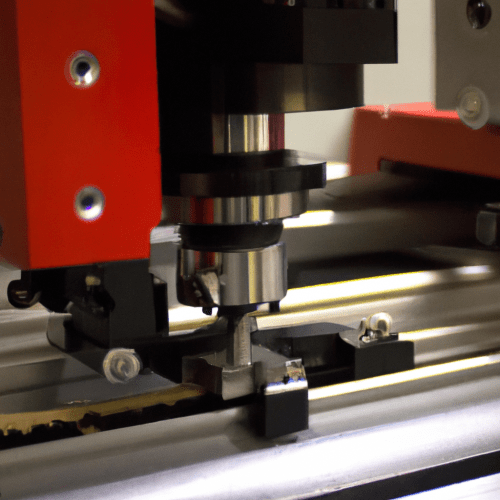
Integrating Computer Numerical Control (CNC) routers into educational settings provides students with invaluable hands-on experience in modern manufacturing and design principles. These machines bridge theoretical knowledge with practical application, fostering critical thinking and problem-solving skills essential for STEM fields. Selecting the appropriate CNC router for a classroom requires careful consideration of safety, software, curriculum alignment, physical footprint, and tooling costs.
Educational institutions prioritize machines that are not only capable but also safe, reliable, and easy for students to operate under supervision. Desktop CNC routers, for instance, offer a balance of functionality and manageability, making them ideal for introductory and intermediate STEM programs. They allow educators to introduce complex concepts in a controlled, accessible environment.
Classroom Safety Enclosures for Educational CNC Routers
Ensuring student safety is paramount when operating CNC machinery in a classroom environment. Dedicated safety enclosures are a critical component, designed to contain chips, dust, and broken tool fragments, while also preventing accidental contact with moving parts. These enclosures create a physical barrier, significantly reducing the risk of injury during operation.
Many educational CNC routers are available with integrated safety enclosures, or schools can opt for custom-built solutions. Key features of effective enclosures include interlock safety switches, which immediately halt machine operation if a door or guard is opened. This prevents access to hazardous areas while the spindle is running or parts are in motion.
Beyond physical barriers, sound dampening is another crucial aspect of classroom enclosures. CNC routers can generate significant noise, which can be disruptive in a learning environment. Enclosures constructed with high-density materials like MDF, combined with acoustic foam or composite panels, can substantially reduce noise levels, creating a more conducive learning atmosphere.
Proper dust and chip containment within the enclosure is also vital for maintaining air quality and machine longevity. Integrated dust collection systems, often with multiple connection ports, are essential for managing debris generated during machining operations. This contributes to a cleaner workspace and reduces exposure to airborne particles.
Desktop Footprint and Work Envelope Considerations
| Feature | Typical Educational CNC Router Specification | Benefit for Schools |
|---|---|---|
| Work Envelope (X, Y) | 300x180mm to 600x900mm | Accommodates diverse projects from small parts to larger assemblies. |
| Spindle Power | 1.5 kW to 3 kW (2-4 HP) | Sufficient for wood, plastics, foams, and light aluminum without excessive power. |
| Spindle Speed | Up to 18,000 – 24,000 RPM | Versatile for various materials and cutting operations. |
| Motion Accuracy | ±0.001 to ±0.005 inches | Ensures precision for engineering projects and part fitment. |
| Safety Features | Enclosed cutting area, interlock switches, E-stop | Maximizes student protection and compliance with safety standards. |
| Control Software | User-friendly CAM (e.g., Carbide Create, VCarve, Fusion 360) | Facilitates quick learning and efficient toolpath generation for students. |
Space constraints are a common challenge in educational facilities, making the physical footprint of a CNC router a significant selection factor. Desktop and benchtop CNC routers are specifically designed for compact spaces, fitting onto standard lab benches or mobile carts. Their smaller dimensions allow for greater flexibility in classroom layout and storage.
Typical work areas for educational desktop CNC routers range from approximately 300 x 180 mm (12 x 7 inches) for introductory models, up to 460 x 460 mm (18 x 18 inches) or even 600 x 900 mm (24 x 36 inches) for more advanced projects. The ‘work envelope’ defines the maximum dimensions of a workpiece that can be machined, directly impacting project scope.
While larger work envelopes offer more versatility for bigger projects like robotics chassis or furniture components, smaller machines are often sufficient for teaching fundamental concepts. A 300 x 180 mm machine, for example, is ideal for personalized nameplates, small signs, or PCB milling. Schools should assess their curriculum needs to match the machine’s work area to intended projects.
Consideration must also be given to the overall machine dimensions, which are larger than the effective cutting area, and the required clearance for safe operation, material loading, and maintenance. A typical 2×4 foot router might require a 6×10 foot area for safe operation, while desktop units need less surrounding space.
Student-Friendly CAM Software for Learning
Accessible Computer-Aided Manufacturing (CAM) software is crucial for successful CNC integration in education. Software designed with intuitive interfaces and simplified workflows allows students to quickly grasp toolpath generation and machine control without being overwhelmed by complex industrial features.
Many educational CNC systems bundle or recommend software that caters to beginners. Programs like Carbide Create, VCarve, and Fusion 360 are popular choices due to their user-friendly nature and extensive educational resources. Fusion 360, for instance, offers robust CAD/CAM capabilities with free educational licenses, enabling students to design and generate toolpaths for a wide range of materials.
PathPilot, often associated with Tormach machines, provides a straightforward control interface, allowing students to simulate machine operations and create programs even without direct access to a physical machine via PathPilot HUB. This virtual environment is invaluable for maximizing student practice time and minimizing machine queueing.
Software compatibility with common design platforms is also important. Many CAM programs can import designs from various CAD software, ensuring flexibility in the design process. This allows students to use familiar CAD tools before transitioning to CAM for toolpath creation.
Integrating CNC Routers Into STEM Curricula
CNC routers are powerful tools for enriching Science, Technology, Engineering, and Mathematics (STEM) education by providing hands-on, project-based learning opportunities. They allow students to apply theoretical concepts from physics, mathematics, and engineering to tangible outcomes, fostering a deeper understanding of these disciplines.
Curriculum integration can range from introductory projects in middle school, focusing on basic coordinate systems and tool changes, to advanced engineering challenges in high school and college. Students can design and fabricate components for robotics teams, create custom prototypes, or produce artistic designs, directly linking classroom learning to real-world applications.
Project-based learning with CNC routers encourages iterative design, problem-solving, and collaboration. Students learn about material properties, tool selection, and the impact of feeds and speeds on machining quality. This practical experience is vital for developing skills that are directly transferable to manufacturing careers and higher education programs.
Educators can leverage CNC technology to teach concepts such as geometric dimensioning and tolerancing (GD&T), material science, and automation. The process of taking a digital design to a physical object reinforces computational thinking and precision engineering, preparing students for future technical roles.
Affordable Tooling Options and Machining Practices
Managing tooling costs is a practical consideration for educational budgets. Fortunately, a wide array of affordable and durable router bits are available, suitable for the common materials used in school settings, such as wood, plastics, foams, and soft metals like aluminum.
Common router bit materials include high-speed steel (HSS) for general-purpose cutting and carbide for increased durability and performance, especially when machining harder plastics or aluminum. End mills, ball-nose cutters, and V-bits are fundamental tools for various operations, from roughing to fine engraving.
Standard tolerances for educational CNC projects typically range from ±0.001 to ±0.005 inches, depending on the machine’s rigidity and the material being cut. While wood projects may not demand extreme accuracy, plastic and metal components for robotics or engineering designs often require tighter tolerances for proper fit and function.
Appropriate feeds and speeds are critical for tool longevity and machining quality. For educational purposes, conservative parameters are often recommended to minimize tool breakage and ensure student success. For softwoods and plastics, typical spindle speeds might range from 10,000 to 18,000 RPM, with feed rates adjusted based on tool diameter and material hardness. For example, a 1/4-inch two-flute end mill in acrylic might run at 15,000 RPM with a feed rate of 40-60 inches per minute. Always consult tool manufacturer guidelines and perform test cuts to optimize parameters for specific materials and tools.
Maintaining a stock of common collet sizes, such as 1/8′, 1/4′, 3/8′, and 1/2′, ensures compatibility with a variety of router bits. Implementing a structured tool management system helps track usage and simplifies reordering, contributing to cost-effective operation in a busy classroom environment.