
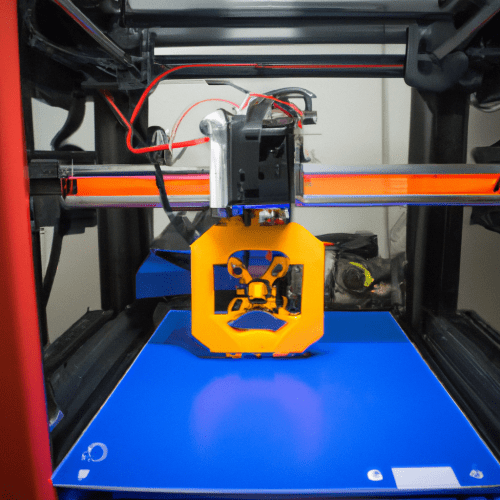
Additive manufacturing, commonly known as 3D printing, has become increasingly accessible, yet achieving consistent, high-quality results demands a solid grasp of technical principles. While entry-level machines simplify some processes, successful 3D printing still involves navigating several critical technical domains, from software configuration to material science and mechanical adjustments.
Many perceive 3D printing as a ‘press-and-print’ operation, but this overlooks the intricate interplay of factors influencing print quality and reliability. Engineers and hobbyists alike must develop a methodical approach to troubleshooting and optimization, ensuring each component of the workflow is precisely tuned.
Mastering Slicing Software
Slicer software acts as the crucial intermediary between a 3D model and the physical printer, translating a digital design into machine-readable G-code. Popular options in 2026 include OrcaSlicer, Bambu Studio, Ultimaker Cura, and PrusaSlicer, each offering varying levels of complexity and features. OrcaSlicer is often considered the best overall for FDM users due to its calibration tools and broad printer support, while Cura remains a top choice for beginners due to its user-friendliness and extensive community.
Learning the basics of a slicer involves understanding parameters like layer height, infill density, print speed, and support structures. Advanced users delve into settings such as retraction distance and speed, flow rate, and temperature adjustments, which are critical for resolving common print issues like stringing or under-extrusion.
Effective slicer utilization requires iterative testing and calibration. Users often employ ‘temperature towers’ to determine optimal print temperatures for new filaments, or ‘retraction towers’ to fine-tune retraction settings, minimizing defects. This systematic approach helps establish reliable profiles for various materials and geometries.
Precision Bed Leveling Techniques
| Filament Type | Nozzle Temperature Range (°C) | Bed Temperature Range (°C) | Moisture Sensitivity |
|---|---|---|---|
| PLA | 190-220 | 50-70 | Moderate to High |
| ABS | 230-260 | 90-110 | Low to Moderate |
| PETG | 220-250 | 70-90 | Moderate |
| TPU | 210-230 | 30-60 | High |
| Nylon | 240-260 | 60-80 | Very High |
Achieving a perfect first layer is paramount in 3D printing, directly impacting print adhesion and overall part quality. Bed leveling ensures the print surface is uniformly equidistant from the nozzle across its entire area. Manual bed leveling typically involves adjusting screws beneath the print bed while using a feeler gauge or a piece of paper to set the nozzle gap. This process demands patience and precision to achieve a consistent ‘squish’ on the first layer.
Modern 3D printers frequently incorporate automatic bed leveling (ABL) systems, utilizing sensors like BLTouch, CRTouch, or inductive/capacitive proximity sensors. These systems probe multiple points on the print bed, creating a mesh that compensates for minor surface irregularities. Even with ABL, a correct Z-offset calibration is essential, defining the exact distance between the nozzle and the bed after the ABL routine.
Standard tolerances for first-layer height are critical; a nozzle too close can cause ‘elephant’s foot’ or nozzle clogging, while one too far results in poor adhesion and warping. A typical first layer height is often set between 0.2mm and 0.3mm, with a slightly wider extrusion width to enhance bed adhesion.
Diagnosing Filament Issues
Filament quality and condition significantly influence print success. Many filaments, particularly PLA, PETG, and Nylon, are hygroscopic, meaning they absorb moisture from the air. Wet filament can lead to numerous print defects, including popping sounds during extrusion, stringing, rough surfaces, and weakened layer adhesion.
Proper filament storage is crucial to prevent moisture absorption. Airtight containers with desiccant packs, such as silica gel, are highly recommended. For highly hygroscopic materials or in humid environments, dedicated filament dry boxes or dehydrators are often necessary to maintain optimal print quality.
Extrusion problems, such as under-extrusion or inconsistent flow, can also stem from clogged nozzles, worn extruder gears, or incorrect print temperatures. Regular maintenance, including cleaning the nozzle with a brass brush or performing ‘cold pulls,’ helps prevent blockages and ensures smooth material delivery.
Effective Print Failure Handling
Print failures are an inevitable part of the 3D printing process, even for experienced engineers. Common issues include warping, layer shifting, stringing, and poor bed adhesion. Warping, particularly with materials like ABS, occurs due to uneven cooling and differential contraction, often mitigated by using a heated bed and an enclosure.
Layer shifting, where layers become misaligned, typically results from mechanical issues such as loose belts, slipping pulleys, or the print head colliding with the model. Addressing these requires tightening belts, cleaning rails, and ensuring stable printer movement.
Stringing, characterized by fine plastic threads between printed parts, is usually resolved by optimizing retraction settings (distance and speed), lowering print temperature, and ensuring dry filament. Poor bed adhesion, leading to prints detaching, often requires careful bed leveling, proper Z-offset, and potentially adhesion aids like glue stick or specialized build surfaces.
Essential 3D CAD Modeling Basics
While 3D printing focuses on fabrication, the process begins with a robust 3D model. Basic CAD modeling skills are fundamental for creating printable designs or modifying existing ones. Users should be familiar with creating geometric primitives, performing Boolean operations (union, subtract, intersect), and understanding concepts like manifold geometry. Non-manifold edges or gaps in an STL file can lead to slicing errors and print failures.
Several CAD software options cater to different skill levels, from beginner-friendly browser-based tools like Womp to more professional parametric modelers like Shapr3D and FreeCAD. For 3D printing, models are typically exported in mesh formats such as STL, OBJ, or 3MF, which describe the model’s surface using interconnected triangles.
Designing for printability involves considering factors like overhang angles, wall thickness, and support requirements. Understanding these design constraints during the CAD phase can significantly reduce post-processing and increase print success rates. Engineers often optimize models to minimize material usage and print time while maintaining structural integrity.